

Reducing compliance complexity through AI-powered design, rapid prototyping, and user validation within days

Who are we?
MEDStaff Connect is an AI-powered SaaS platform that connects healthcare facilities with verified workers by streamlining credential submission and compliance checks.
It operates as a B2C model as Healthcare workers submit credentials to get verified and approved for work
My experience
Project length: 3 days
I designed an AI-assisted credentialing experience from scratch, enabling healthcare workers to upload and validate multiple documents (licenses, certifications, vaccinations) while ensuring compliance across different Australian state requirements.
I also leveraged AI throughout the design process to:
Accelerate ideation and prototyping
Improve decision-making
Explore AI-native UX patterns
Case #1 — Credentialing Healthcare Workers with AI
Overview
Credentialing healthcare workers is traditionally manual, slow, and error-prone, creating delays in onboarding and increasing compliance risks.
My Role
Planned and executed research with AI-assisted insights
Designed AI-assisted experiences, not just interfaces
Defined AI vs human responsibilities in a regulated system
Rapidly prototyped solutions using Lovable (vibe coding)
Considered compliance, trust, and risk as core design constraints
UX Impact
Reduced cognitive load for workers during document submission
Increased transparency in AI decisions (confidence levels, feedback loops)
Improved trust through human-in-the-loop validation
Problems
Challenges Faced by MedStaff
Problem #01
Inefficient manual verification across roles and state requirements creates a high administrative workload, slowing down hiring and onboarding.
Impact:
• Admins spend hours verifying requirements across states
• High risk of requesting incorrect or incomplete documents
• Inconsistent processes across teams and locations
• Increased delays during peak hiring periods
Problem #02
Compliance risk is heightened, as missing or expired documents can lead to legal and regulatory issues, and inconsistent verification increases overall liability. The lack of a reliable system to track documents and monitor expiries leads to operational delays and bottlenecks
Impact:
• Compliance risks due to expired or missing credentials
• Operational delays in worker onboarding
• Increased admin workload and stress
Problem #03
Low completion rates—workers dropping off or submitting incomplete credentials—directly impact MedStaff’s ability to supply a ready and compliant workforce.
Impact:
• Incomplete submissions
• Delays in verification
• Low confidence in whether documents were correctly submitted
Users problems
Survey data from 132 participants, including administrators and frontline healthcare workers, was provided by the MedStaff team. I analysed and synthesised the findings to uncover key pain points and design opportunities, which directly informed the MedStaff platform.
Worker Perspective:
The process felt overwhelming and unclear.
Many were unsure which documents were required or whether submissions were complete.
This uncertainty often led to incomplete uploads and approval delays.
Administrator Perspective:
Manual verification across varying state requirements was time-consuming and mentally taxing.
Lack of trust in the system led to double-checking information, increasing workload and slowing down approvals.
Discovery Phase
Who are we solving for?
#1 Persona outline

Healthcare workers
Cris - Nurse
Interviewed +4
These were health care workers who are highly in demand and understand the importance of keeping their certifications up to date. They want a lightweight, intuitive solution that allows them to submit documents quickly so they can focus on patient care rather than paperwork.
User goals:
Upload all documents quickly
Know exactly what is required
Avoid rejection or delays
Start the employment as soon as possible
#2 Persona outline

Admin/Compliance Officer/HR Team
Seth - Compliance Officer
Interviewed +2
These were admin staff who were responsible for managing large groups of current and new employees. Their focus is on expanding teams while maintaining full compliance, ensuring hospitals and medical facilities meet operational and financial goals, and minimising risk. Their challenge is integrating credential management seamlessly into existing workflows.
User goals:
Verify credentials quickly
Ensure compliance across states
Reduce manual work
Make sure all employees are compliant and suitable for their role
Unlocking the opportunities with AI assistance in 40-minutes session
To accelerate early ideation phase, I leveraged ChatGPT alongside tools like Lovable, Stitch, and v0 to quickly translate initial ideas into a structured, end-to-end workflow.
In a focused 38-minute session - ideation, I moved from a blank slate to a validated system-level markdown that mapped user flows, edge cases, and AI-human interaction points. Rather than spending hours iterating across fragmented tools, this approach created a strong foundational structure upfront, reducing gaps typically missed during ideation.
This rapid process helped:
Turn ambiguous ideas into a complete workflow
Identify risks, edge cases, and failure points early
Reduce iteration cycles across multiple tools
Establish clear roles between AI automation and human decision-making
-
Reducing Cost and Token Consumption:
To optimise both cost and workflow efficiency, I used ChatGPT strategically during the discovery phase to generate a structured markdown of the full system before moving into prototyping tools like Lovable, Stitch, and v0.By front-loading ideation and system thinking into a single, consolidated output, I avoided repeated prompt iterations across multiple tools—significantly reducing token usage and overall cost. Instead of exploring ideas directly inside prototyping environments, I entered those tools with a clear, validated structure, making execution faster and more focused.
This approach resulted in:
Fewer redundant prompts across tools
Lower overall token consumption
Faster transition from idea to prototype
More consistent outputs across platforms
It also enabled faster iteration cycles. Insights and features generated in one AI tool could be reused and refined across others, allowing me to progressively improve the solution without restarting the thinking process each time. Instead of generating from scratch, I built on validated ideas—leading to more iterations in less time, with better quality outcomes and lower cost.
-
Key Decisions and Rationale
The generated markdown wasn’t just a flow—it was intentionally structured to cover critical system components often missed in early-stage design:End-to-end user flows (worker + admin)
Ensures the system is designed holistically, avoiding siloed experiences that break in real use.Role-based logic and requirements
Critical for Australian healthcare compliance, where requirements vary by role and state.AI-assisted document intake (step and oriented upload)
Reduces friction and increases completion rates by guiding users instead of relying on static forms.Bulk upload + real-time file recognition with AI
Minimises repetitive actions and speeds up submission, directly addressing drop-off points.AI pre-verification (data extraction + validation)
Reduces manual workload and surfaces structured data for faster admin decisions.User feedback loop (confirm/correct AI outputs)
Improves accuracy while building trust and reducing downstream errors.Status visibility and progress tracking
Addresses user anxiety and reduces support queries during processing delays.Notification system (approval, rejection, expiry)
Closes the loop quickly and ensures ongoing compliance, not just one-time verification.Admin dashboard with prioritisation (urgency, expiry, status)
Enables scalable workforce management and faster response to critical cases.AI confidence indicators and risk flags
Helps workers and admins focus only on exceptions instead of reviewing every document manually.Human-in-the-loop decision making
Maintains accountability and aligns with compliance requirements where automation alone is insufficient.Edge cases and exception handling
Ensures the system is resilient in real-world scenarios, not just ideal flows (eg: documents overseas etc).Learning system (AI improves from corrections)
Creates long-term efficiency gains by reducing repeated errors over time.
⚠️ Why This Matters
This structured approach turned AI from a generative tool into a thinking partner, allowing me to rapidly define a complex, compliance-heavy system while keeping costs controlled and outputs aligned.
It also ensured that when moving into prototyping, the focus shifted from figuring out what to build to executing how it should work—which is where real efficiency is gained.
Analysis
What best-in-class compliance healthcare platforms are doing right with AI assistance analysis
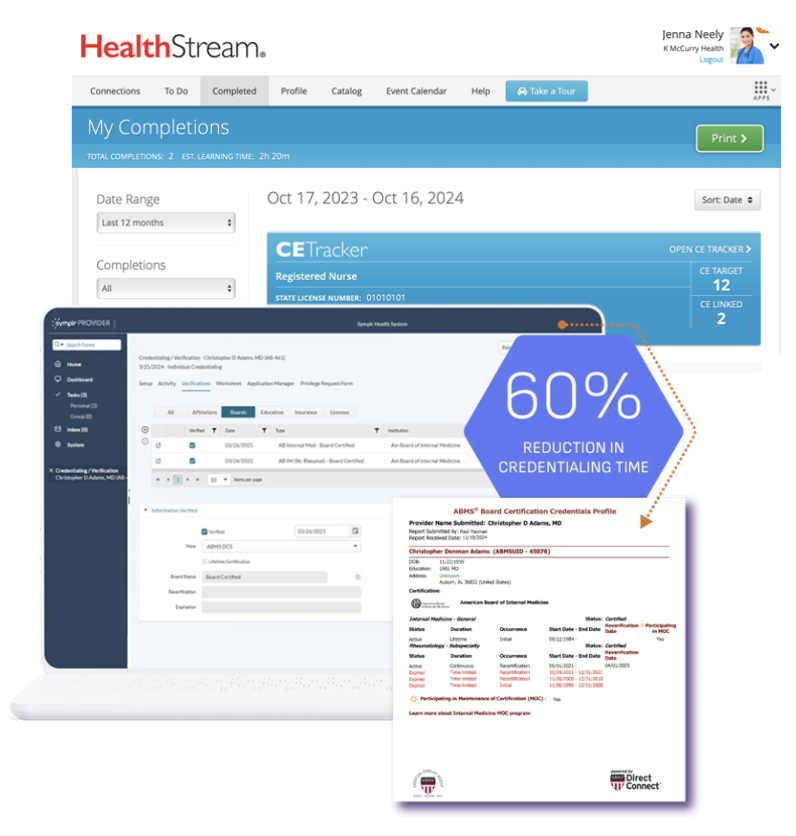
#1
Compliance based on state can be a big differential
#2
Human review is still essential
#3
Workers experience can be explore
#4
AI capabilities are minimal or missing
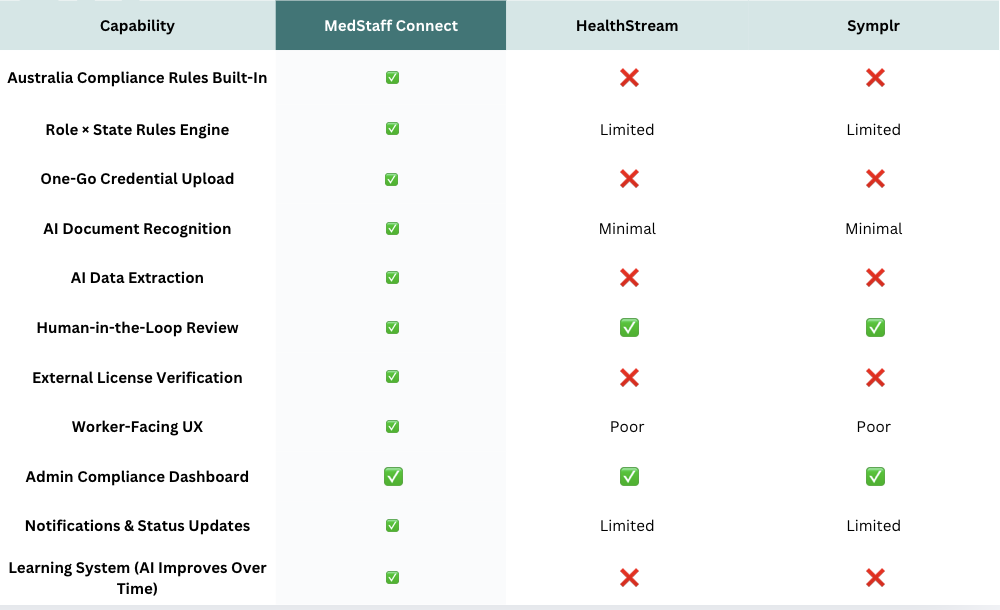
Evaluating and Excluding AI-Generated Directions
Using ChatGPT, I explored platforms like Genda, eCredential, Proda, Certemy, and SkillSurvey during a ~20-minute evaluation
While useful for benchmarking, they were excluded due to key gaps:
No role vs state compliance rules engine
Lack of external license verification
Weak or missing admin compliance dashboards
Not tailored to healthcare staffing or enterprise scale
Misalignment with regulatory and government standards
Delivery Phase
Design and Development
Based on our research, I defined a strategy to balance AI automation with human control. Those are the key design considerations:
Balancing AI Automation and Human Control
Designing for a regulated healthcare environment required a deliberate approach to how AI is applied. Instead of defaulting to full automation, I defined a framework that balances efficiency with human oversight.
AI was prioritised for repetitive, pattern-based tasks such as document recognition, data extraction, and mismatch detection, where it can significantly reduce manual effort and improve consistency.
For areas involving ambiguity, risk, or compliance, human involvement was preserved, with final decisions remaining under human control. In between, a hybrid model was introduced, where AI generates recommendations or flags issues, and humans validate the outcome.
This approach ensures the system scales efficiently without compromising safety, trust, or accountability.
For System
| Situation | AI | Human | Hybrid | Why |
|---|---|---|---|---|
| Defining state documents compliance requirements | ✔ | Requirements sourced from: National regulators (e.g. AHPRA), State authorities (WWCC, Police Checks), Public health guidance, Hospital and staffing agency policies. | ||
| Defining role-based requirements | ✔ | Requirements vary by role and context. AI assists, but human validation ensures accuracy and compliance. Considering documents like License, Scope-specific certification, State-based Safety Guarding checks, Immunisation evidence, ID, Legal work eligibity, department-specific competencies (if required), and more. | ||
| License & identity verification | ✔ | AI extracts and cross-checks data with external sources, while humans review mismatches and approve outcomes. | ||
| Notifications & updates | ✔ | Automated notifications keep users informed and reduce delays without requiring manual intervention. |
While the system focuses on compliance and risk management, the worker experience prioritises clarity, speed, and confidence. The following outlines how AI supports workers during document submission, while still allowing them to review, correct, and provide feedback where needed.
For workers
| Situation | AI | Human | Hybrid | Why |
|---|---|---|---|---|
| Recognise state in a file and match to selected | ✔ | AI identifies whether the document matches the selected state. Users can optionally provide feedback. | ||
| Validate country | ✔ | AI detects issuing country and checks compliance with state requirements. Users can provide feedback or notes for admin review. | ||
| Recognising file type | ✔ | AI recognises patterns to identify document types, with support for validation when needed. | ||
| Recognise if it is an original file | ✔ | AI detects authenticity patterns and can cross-check with third-party sources. | ||
| Extract expiry dates | ✔ | AI extracts dates from documents. Users can provide feedback if corrections are needed. | ||
| Extract license number | ✔ | AI identifies and extracts licence numbers, with potential validation via third-party systems. |
Once documents are submitted, the focus shifts to the administrative workflow, where accuracy, compliance, and accountability are critical. While AI supports pre-verification and highlights potential issues, administrators remain in control of reviewing, validating, and making final decisions. This ensures that the process remains efficient without compromising regulatory standards or risk management.
For admin
| Situation | AI | Human | Hybrid | Why |
|---|---|---|---|---|
| Create and invite new worker | ✔ | Admin inputs worker details and selects role and state, enabling the system to generate required documents accurately. | ||
| Pre-verify documents | ✔ | AI checks if submitted data matches required documents based on role and state, reducing manual effort. | ||
| Verify documents | ✔ | ✔ | Admin reviews documents, validates AI results, checks notes, and provides feedback to improve system accuracy. | |
| Approve or reject documents | ✔ | Final decisions remain with the admin due to compliance risks, including handling low-quality files, incorrect types, expired documents, or mismatches. |
Designing with a markdown prompted by ChatGPT to Lovable
Designed and prototyped the MVP for both admin and worker flows using Lovable, using “plan” mode to optimise token usage and guide the build. I applied an existing design system with defined colour and style parameters to maintain consistency.
The prototype completed the initial build in approximately 8 hours, demonstrating the speed of AI-assisted workflows, while also navigating limitations of the free version, such as restricted token usage.
| Goal | Hypothesis | Success Criteria | Risk |
|---|---|---|---|
| Auto-compliance = less admin work | Role + state selection auto-generates correct requirements | 80%+ workers feel requirements are complete and admins rarely add custom documents | Hospitals may require more customization than expected |
| Bulk upload = faster completion | Uploading everything at once is faster than step-by-step submission | 70%+ users prefer bulk upload, completion time is 40% faster, and AI identifies document types with 85%+ accuracy | May feel overwhelming, increasing errors and confusion |
| AI extraction = less manual effort | AI extracts expiry dates, license numbers, and document types automatically | 85%+ extraction accuracy, 50% reduction in admin verification time, and increased admin trust | Document variability may reduce accuracy and trust, leading to re-checking |
| External checks = more admin confidence | AI verifies credentials against external registries (e.g. AHPRA) | Admins accept high-confidence checks without re-verification | Legal constraints, unreliable APIs, or liability concerns may limit automation |
| Identity checks = fraud prevention | Name matching and photo verification detect fraud without impacting real users | <10% false positives and users perceive the process as reasonable | May feel invasive, name variations may fail, or fraud may not be significant |
| Feedback = smarter AI over time | User and admin corrections improve AI accuracy | Users actively provide feedback and measurable accuracy improvements are observed | Low engagement or high variability may limit learning effectiveness |
Validation Phase
From Prototype to Validation
I designed an MVP prototype using Lovable and conducted moderated usability testing with healthcare workers to explore the AI-assisted credentialing experience.
The goal was to evaluate usability, understand user trust and perception of AI during the document upload process, and validate whether the solution aligned with real-world workflows and expectations.
Success criteria
Reduce time-to-verification by 50% to improve onboarding speed
Achieve a completion rate above 85% for full document submission
Reach 85%+ accuracy in AI-driven information extraction (e.g. expiry dates, licence numbers)
Reduce admin review time per worker by 50% compared to the manual process
Guerilla usability test
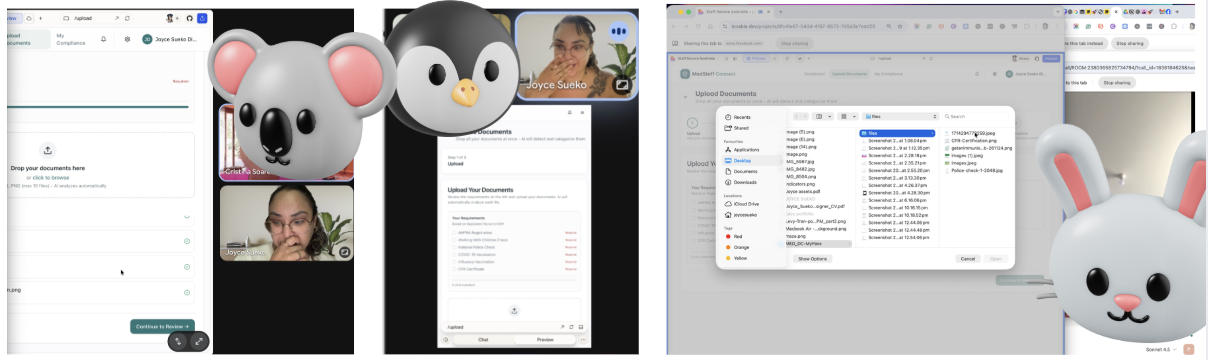
To validate early concepts, I conducted guerrilla usability testing supported by AI-assisted research planning.
I used Claude to help structure a research plan, define hypotheses, and identify key risks to test. The plan was then reviewed and adapted to fit the project context, ensuring it focused on real-world behaviours, trust in AI, and decision-making during credential submission.
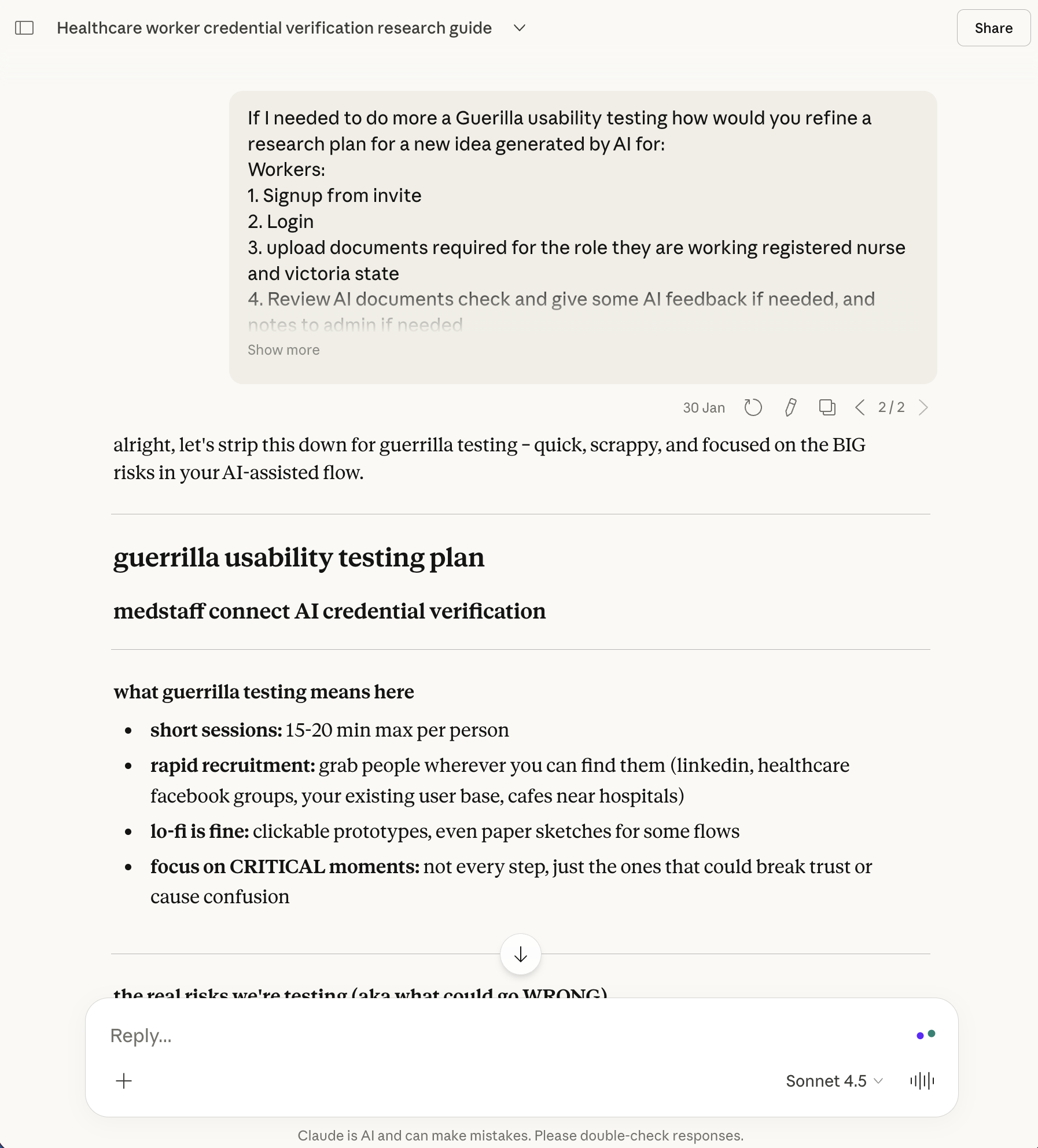
Testing was conducted with four participants, including three healthcare workers (remote) and one participant (in-person) from a related industry, to capture a mix of familiarity and scepticism towards AI-driven processes.
-
The sessions aimed to understand how users interact with AI during credentialing, focusing on trust, clarity of feedback, perceived efficiency, and alignment with real onboarding workflows.
-
The design was guided by hypotheses that AI could reduce admin workload through auto-generated requirements, improve speed via bulk uploads, and minimise manual effort through data extraction. Additional assumptions included increased admin confidence through external verification, effective fraud prevention via identity checks, and continuous improvement through feedback loops.
-
Sessions lasted 15–20 minutes and focused on high-risk moments rather than full flows.
-
For workers, the focus was on understanding requirements, reacting to AI feedback, and confidence in submission outcomes.
-
The research focused on qualitative signals such as confusion, frustration, trust in AI decisions, and perceived value. Behavioural patterns were also observed, including whether users relied on AI or defaulted to manual verification.
Usability Testing Results
To validate early assumptions, I ran moderated usability testing with 4 participants simulating a real onboarding scenario:
“You’ve been invited to work as a registered nurse in Victoria. Upload your credentials to get verified.”
| Page / Section | Issue / Recommendation | Insight | User Quote | Users Affected |
|---|---|---|---|---|
| Upload Documents | Allow users to remove wrong uploads; clarify that files are uploaded to the website only and not yet sent to Admin. | Users felt anxious about making mistakes in a critical process; uncertainty whether documents were sent. | “Not possible to delete wrong files… a bit confused if docs were already sent or not.” | 2/4 users anxious about deleting files; 3/4 users uncertain if documents were sent |
| Review Page | Explain “Low Confidence” and “High Confidence” pills with tooltips; improve contrast of yellow warning; ensure extracted data visible in expanded status. | Users need clearer explanations of flagged items; low contrast and small text affects legibility; some users want to add notes for admin. | “Text was too small… would add note for documents like COVID certificates.” | 2/4 requested clearer explanations; 3/4 noted accessibility issues; 1/4 wanted to add notes |
| Complete Page | Provide context on submission; avoid empty page message for several minutes to reduce confusion. | Users confused when page is empty; they are unsure if upload succeeded and what happens next. | “Empty page was a bit weird… I would wait for approval or contact from employer.” | 3/4 users confused by empty confirmation page |
From Feedback to Clarity: Rapid Improvements in Under 20 Minutes
User feedback from initial testing was implemented to improve clarity, improve AI feedback messaging, and simplify key interactions.
After these iterations, follow-up validation showed that users were able to complete tasks confidently, with no significant usability issues or confusion around the AI-assisted process. This indicated a clear improvement in trust, understanding, and overall experience.
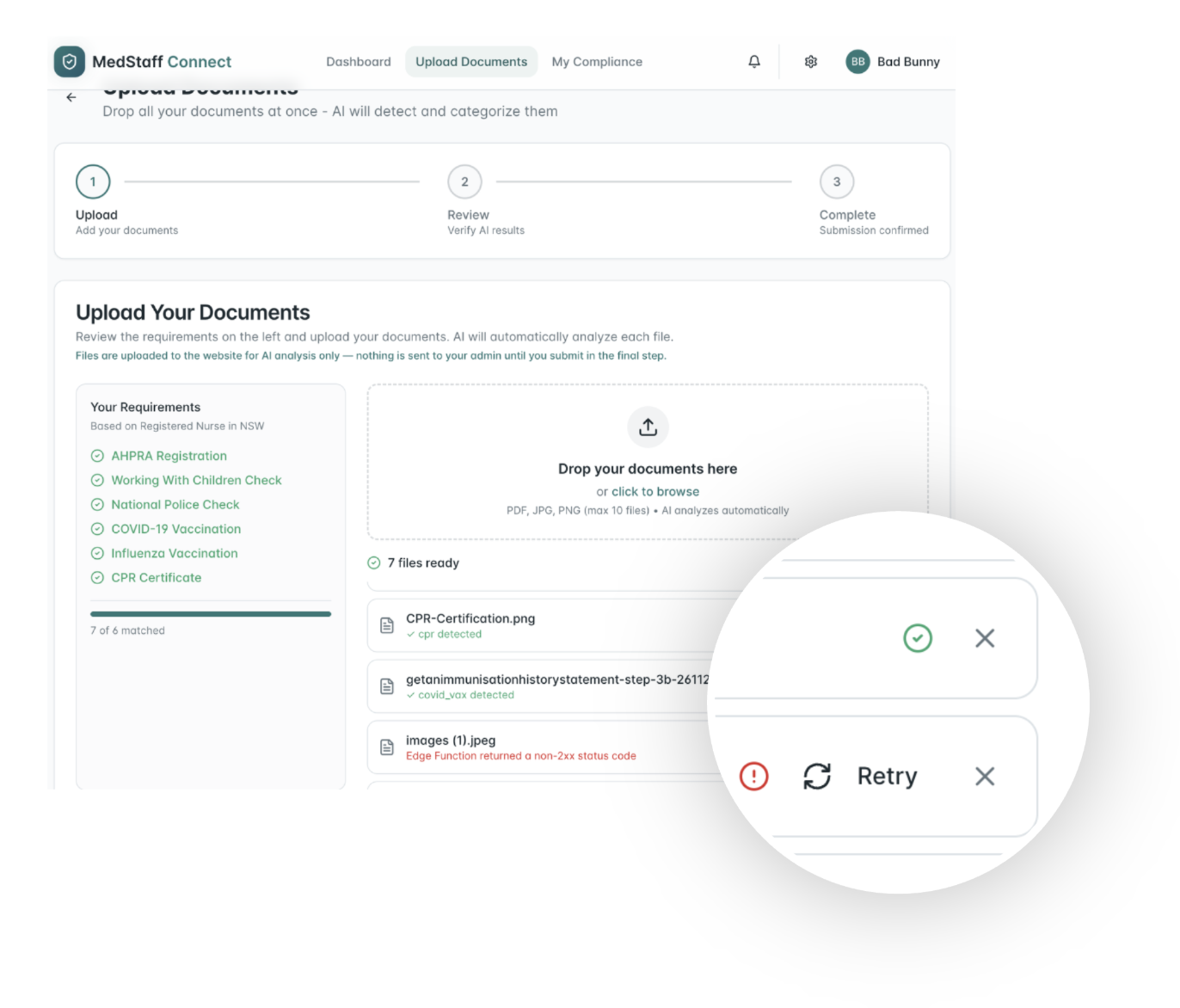
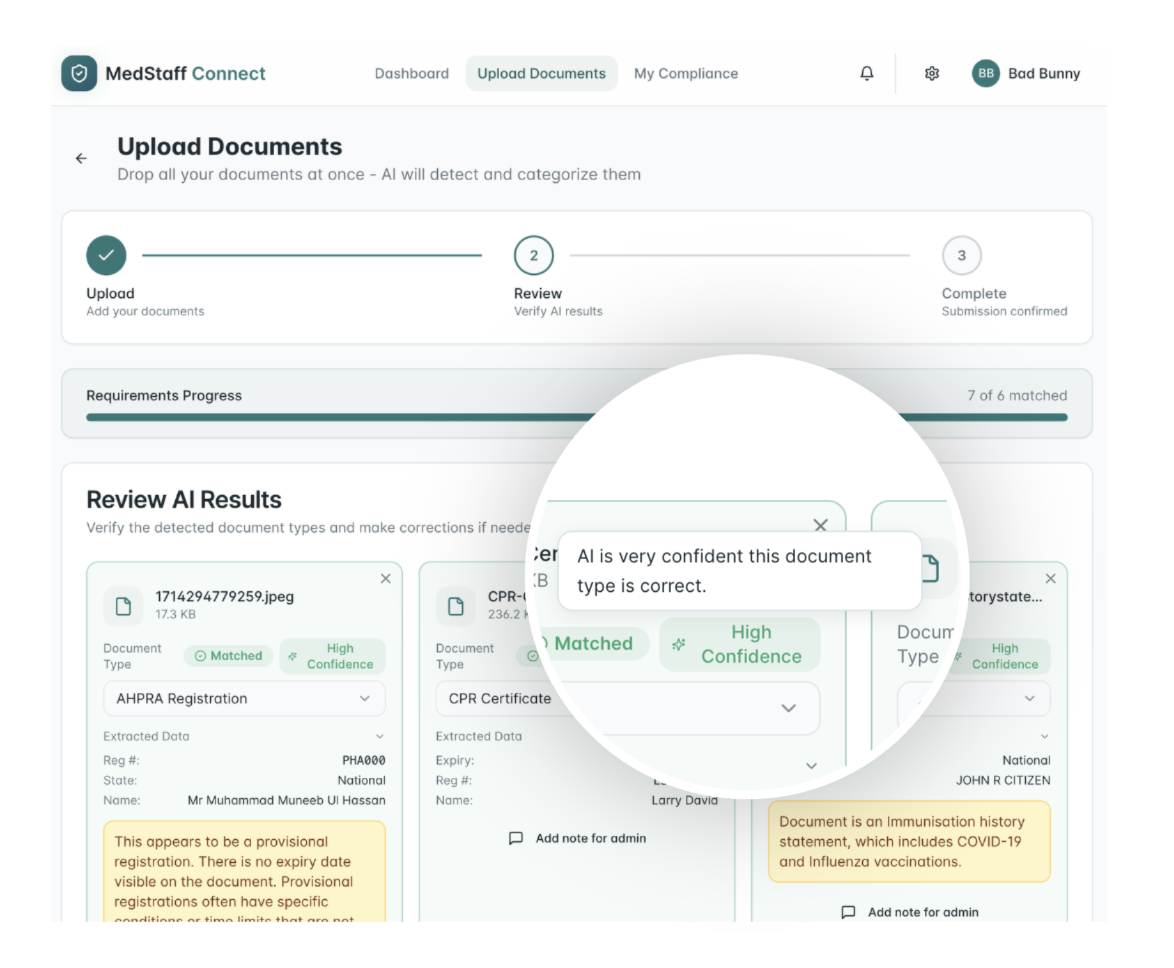
Clarify submission status
Clear messaging was introduced to indicate that uploaded files are not yet submitted to admins, improving transparency and user confidence.
Improve accessibility of warning messages
Warning messages were updated with better contrast and larger text to ensure readability and accessibility.
Explain confidence indicators (pills)
Tooltips were added to provide context on confidence levels and matching status, helping users better understand AI feedback.
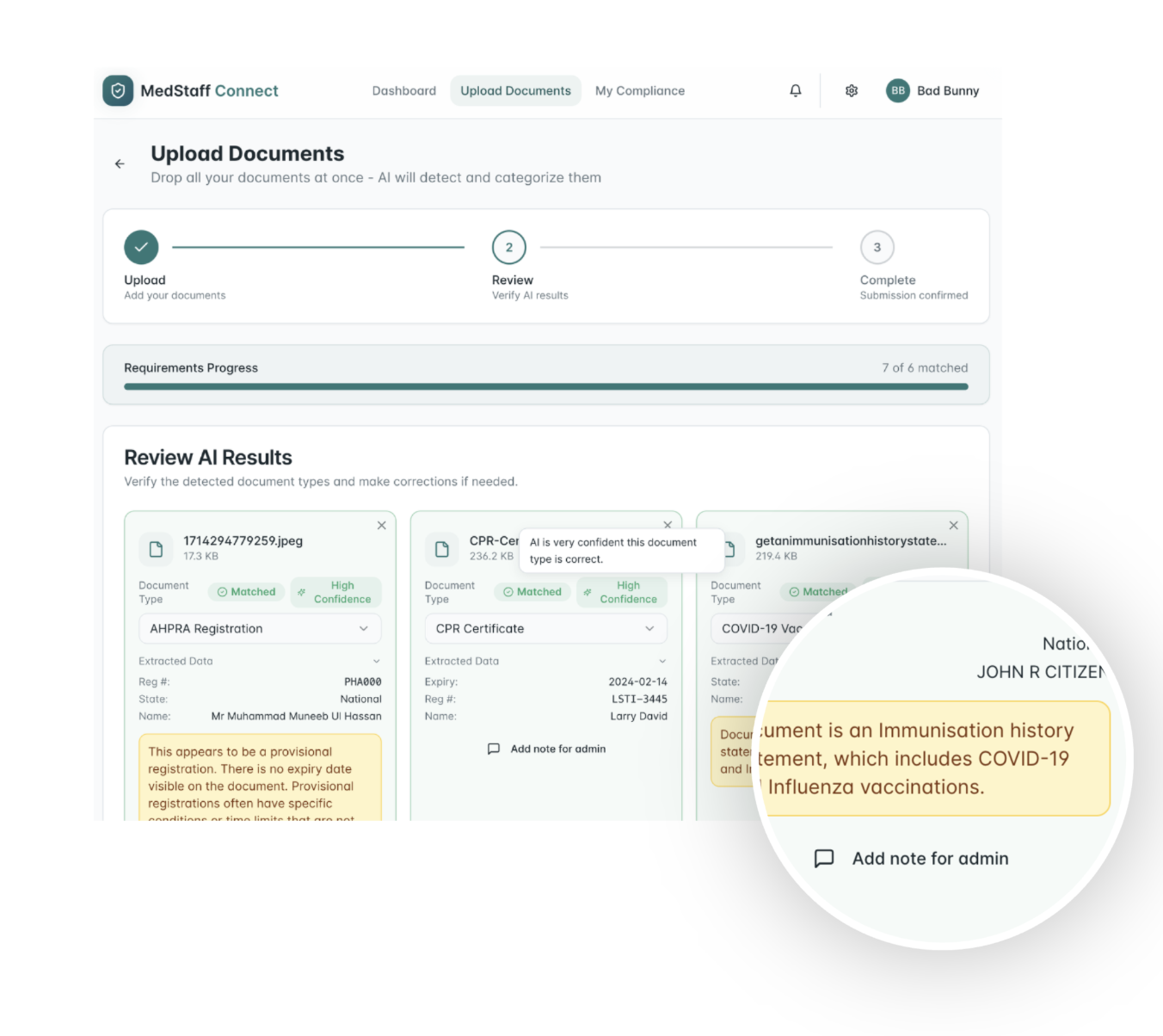
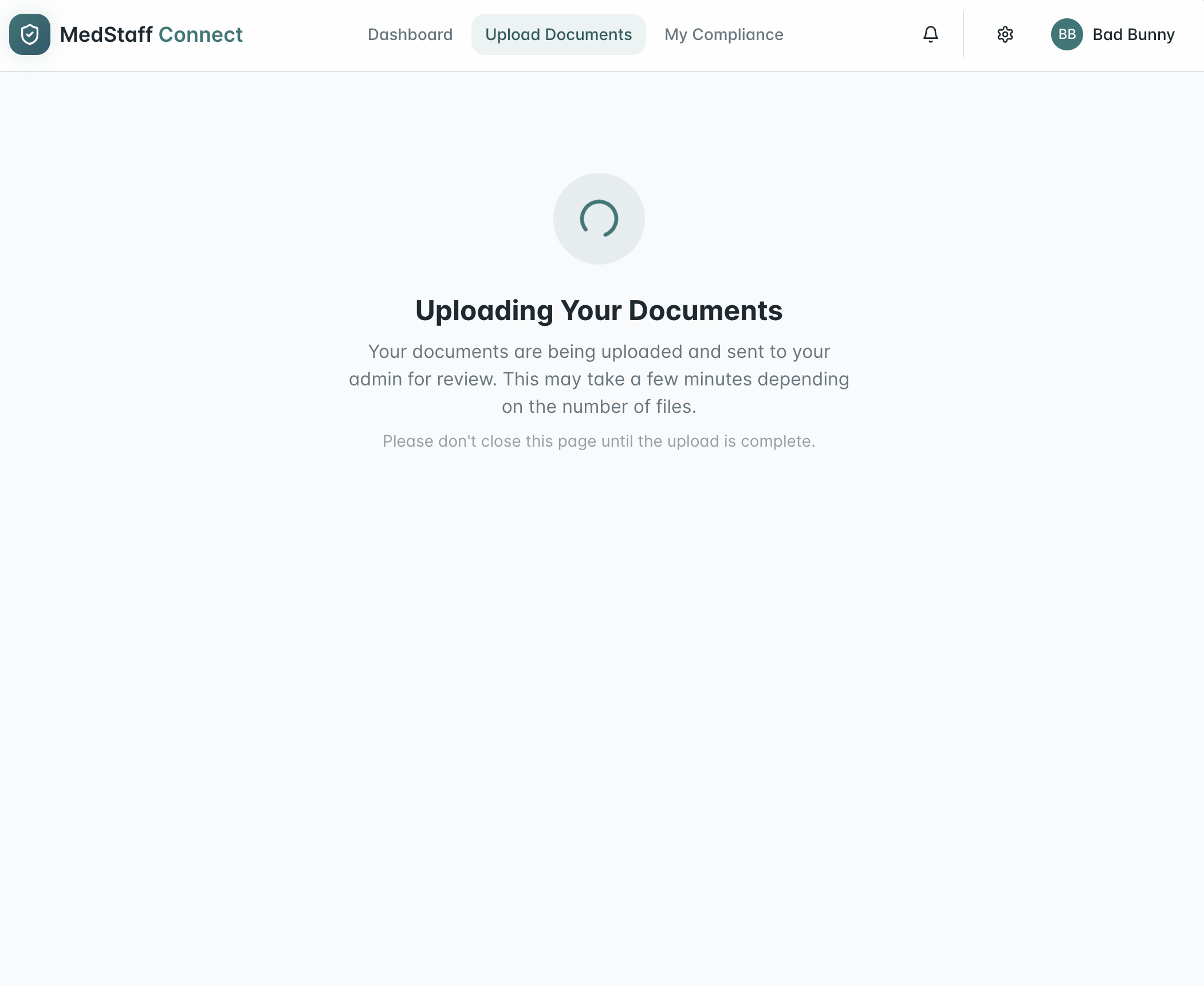
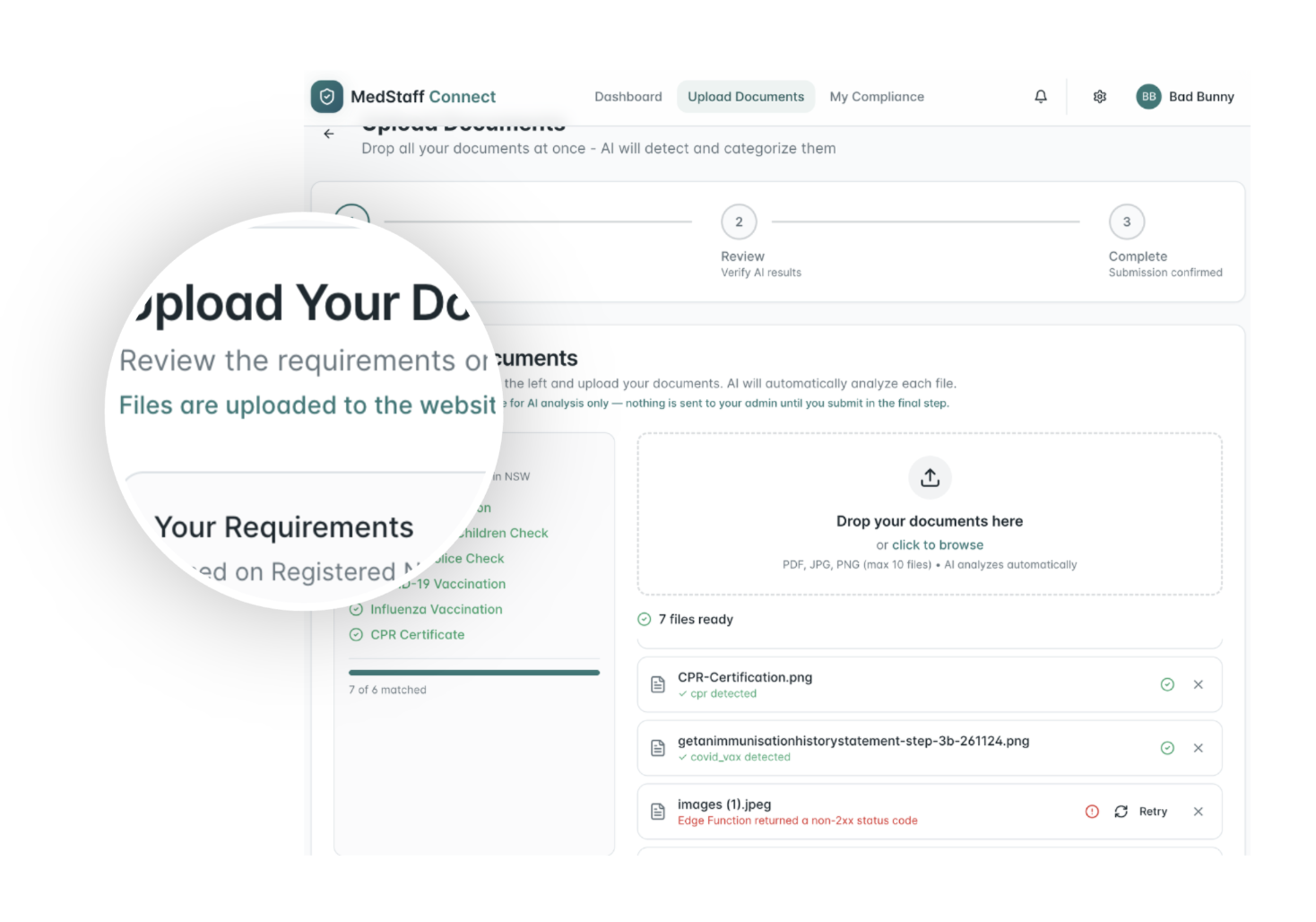
Add file removal functionality
Users can remove incorrectly uploaded files before proceeding, reducing anxiety and preventing errors early in the process.
Enhance loading and submission feedback
Clear progress and status messaging was introduced during file submission, guiding users on what is happening and what to expect next.
Check the improved experience, rapidly iterated and built using Lovable
Outcome
The sessions validated core concepts while revealing gaps in trust and clarity. These insights informed design iterations, particularly improving feedback transparency, simplifying flows, and reinforcing human control.
Rollout Phase
Business Outcome
“This process feels really smooth, seems I can soon start the work
”
#1
Workers can submit credentialing documents in minutes instead of hours, eliminating delays caused by emails, SMS, and other manual communication channels.
#2
Administrators can track and review documents in hours rather than days, with clear audit trails and reduced risk of errors.
#3
Design solutions can be prototyped and refined in less than 8 hours total, compared to days, thanks to AI-assisted ideation and workflow planning.
Next steps
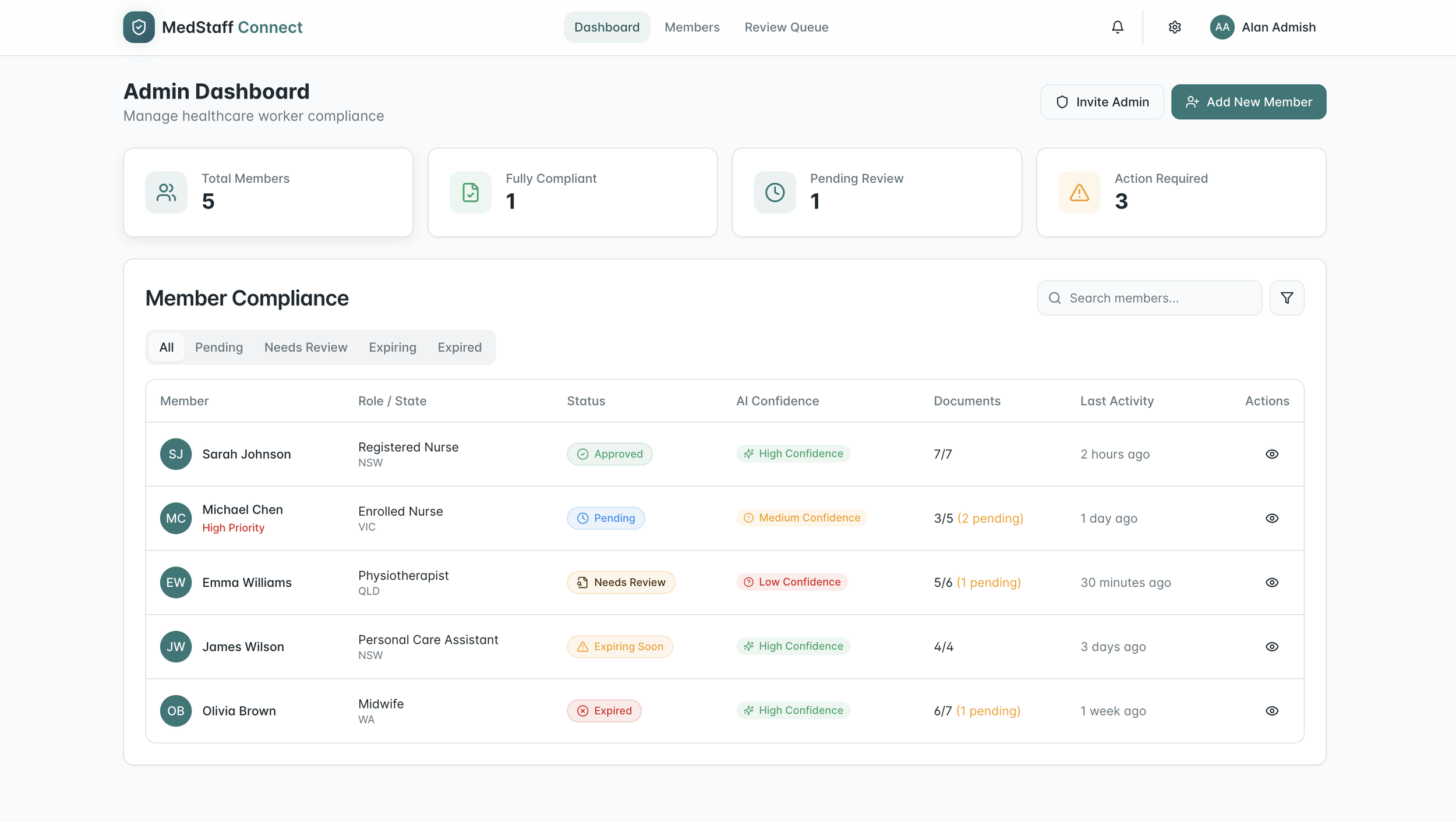
Improve the Admin experience
Validate document requirements across roles and state regulations
Conduct in-depth user interviews to better understand workflows, pain points, and needs
Test the prototype with a broader set of real users to uncover gaps, opportunities, and risks
Align with internal teams to assess feasibility and define a path toward a production-ready MVP
Learnings
Using multiple AI tools strategically can improve outcomes, with features like “plan mode” helping optimise efficiency and reduce token usage
Providing clear context to AI significantly improves the quality and relevance of outputs
AI should support decision-making, not replace it — human validation remains essential for accuracy and trust
Deep user understanding, including workflows, needs, and business context, is critical to delivering impactful solutions
AI enables rapid exploration and testing of new concepts, but integrating with existing systems and experiences remains a challenge
Admin experience
What THEY Say about me
“Joyce uncovered key areas and opportunities that had not been considered, adding significant value to the overall solution.”
THANKS FOR CHECKING IT OUT
Welcome to see my previous works UI Design projects